SURF plaatst functionele cookies om deze website goed te laten werken. Ook plaatsen we analytische cookies om de website te verbeteren. De data wordt waar mogelijk geanonimiseerd.
Ingesloten content (zoals YouTube-video's) kan cookies van derde partijen bevatten. Wil je deze cookies van derden toestaan?
Een aantal onderwijsinstellingen gebruiken ze al: de credits-functionaliteit van SURFspot. Wat kun je met deze functionaliteit en waarom zou je het willen gebruiken? Danique Aaftink, online marketing manager van SURFspot vertelt.
Om het gebruik van open leermaterialen in het Nederlandse hoger onderwijs te bevorderen, verkent SURFnet welke technische mogelijkheden er bestaan om het delen, zoeken en beoordelen ervan minder tijdrovend te maken. Tijd is niet de enige drempel die grootschalig gebruik van open leermaterialen belemmert, maar vanuit het oogpunt van de docent is het wel een doorslaggevend aspect. Hier volgen 13 tips om het metadateren te vergemakkelijken en docenten minder te laten zoeken om te vinden.
Bij netwerkapparatuur zijn van oudsher hardware en software onlosmakelijk met elkaar verbonden en vaak afkomstig van dezelfde leverancier. Met Software Defined Networking (SDN) komt daar verandering in en gaan we toe naar open en programmeerbare netwerken. SDN is een stap naar het netwerk van de toekomst. In een serie van vijf blogs nemen we je mee in de ontwikkelingen die ons en de onderwijs- en onderzoeksinstellingen te wachten staan.
De KU Leuven heeft een prachtige online ondersteuningsmodule voor docenten en studenten waarbij in hele korte clips de diverse stappen die je moet volgen, duidelijk worden toegelicht.
Stitching is easy
So were almost done with this VR grassroots project. As mentioned in our last post we have recorded the Bayesian versus Frequentist debate by Eric-Jan Wagenmakers and Denny Borsboom. The debate lasted a full hour and our recordings were chopped up into seven gigabit sized chunks of approximately ten minutes.
Definitely underpixeled
It’s been a while, I’ve been stuck on lecturing duties, but we finally came around to testing the PIX PRO under different lighting conditions and distances. So, as the title already reveals, 4K is not going to cut it.
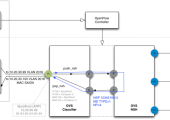
During SC16 (Super Computing 2016), SURF presented a demo to show what we can already do with network function virtualisation. SC is the largest international conference for high performance computing, networking, storage and analysis. Together with the University of Amsterdam, the University of Groningen and the Netherlands eScience Center, we showed the SC16 visitors what we can do in the Netherlands.
New embedded SIM (E-SIM)
A subscription to 2G/3G/4G communication services requires a SIM in a telephone or tablet. These SIMs are issued only to companies that provide a public ICT service. Given that SURFnet provides its services to a closed target group, it was difficult to expand from fixed services into mobile services. SIMs have changed, in part due to the rise of the Internet of Things. The new embedded SIM (E-SIM) can be integrated into a device and overwritten remotely. As well as providing 2G/3G/4G, it opens up a range of other options.
Forse ICT-investeringen om het onderwijs te vernieuwen, leveren bijzonder weinig op voor het studiesucces van studenten. Dit blijkt uit het proefschrift van Nynke Bos, onderwijskundig onderzoeker bij het ICLON, Universiteit Leiden.
Een abonnement op 2G/3G/4G communicatiediensten vereist een simkaart in telefoon of tablet. Het uitgeven van zo’n sim is beperkt tot bedrijven die een publieke ICT-dienst aanbieden. Omdat SURFnet haar diensten aan een gesloten doelgroep aanbiedt, was het moeilijk de vaste dienstverlening uit te breiden met mobiele dienstverlening. Mede vanwege de opmars van het internet-of-things, is de sim veranderd.